Understanding the AI-Ready WordPress: A Simple Guide to the Future
- Introduction: The Arrival of WordPress 7.0
WordPress 7.0 marks a definitive architectural shift in the history of the open web. We are moving beyond the era of managing “static websites” and entering a sophisticated AI-driven and agentic era. Historically, integrating AI into a site often resulted in significant “technical debt”—a cluttered collection of disconnected plugins, each with its own proprietary settings and API keys. The mission of WordPress 7.0 is to solve this by making AI a foundational, integrated part of the platform rather than an external afterthought.
Key Takeaway The release of WordPress 7.0 shifts the platform from a collection of static pages to an intelligent ecosystem. This transformation ensures that AI is integrated into the core architecture, allowing the site to “understand” and “act” rather than just “display.”
This bridge-and-translator setup isn’t just about technical organization; it enables a fundamental shift in how WordPress perceives software functionality: a move toward “Capabilities.”
- The Building Blocks: AI Client and Connectors API
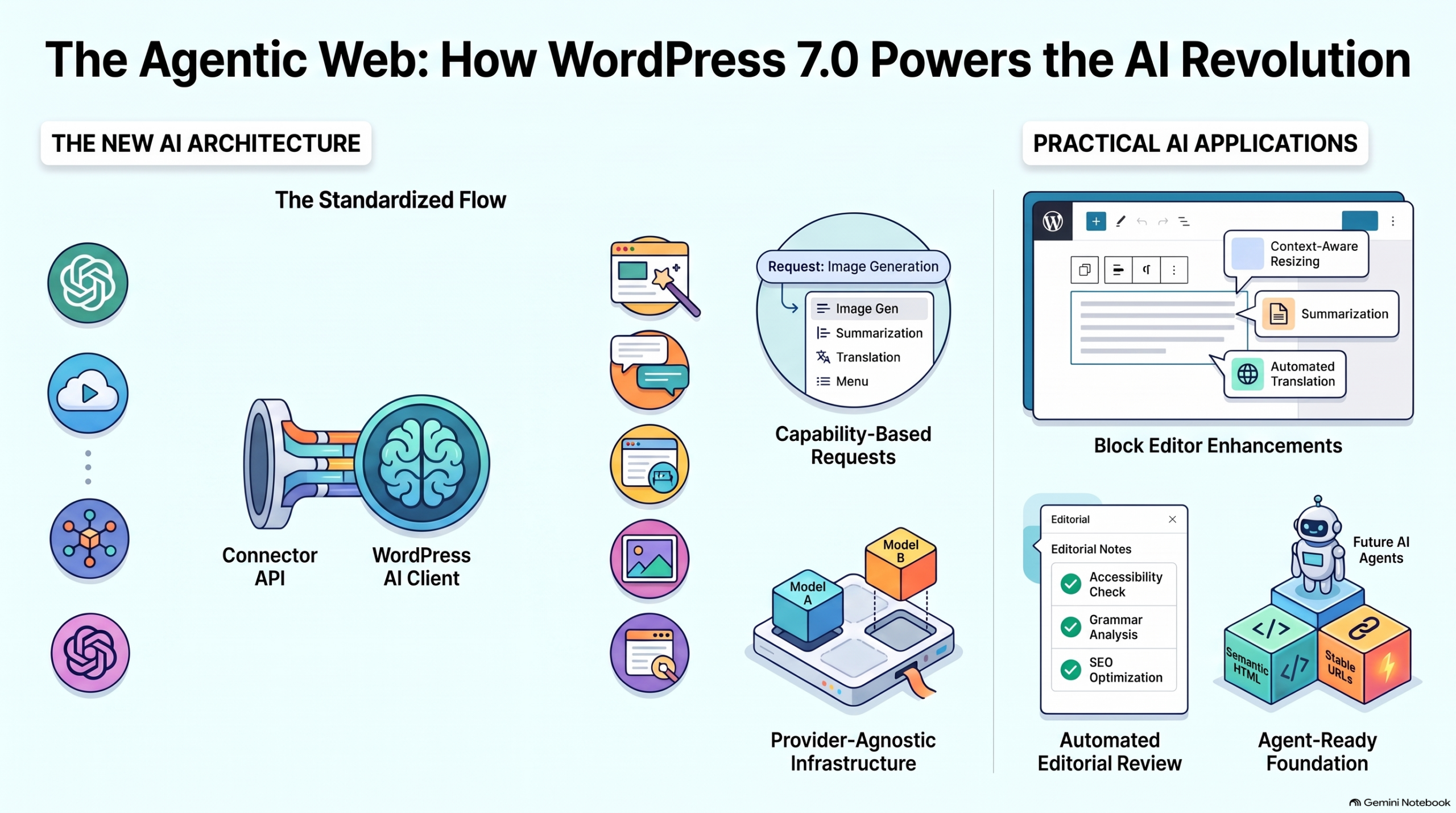
To facilitate this evolution, WordPress 7.0 introduces two foundational APIs designed to standardize how the platform communicates with artificial intelligence. By decoupling the interface from the service provider, WordPress becomes provider-agnostic, ensuring site owners aren’t locked into a single vendor.
Feature Role in the Ecosystem Educational Metaphor
AI Client The internal API that allows plugins to request specific “skills” (like text or image generation). The Internal Translator
Connectors API Manages the secure bridge to external services and handles credentials. The External Bridge
This architecture solves a major pain point for developers and site owners alike. Instead of scattering API keys across dozens of individual plugins, all AI credentials are managed in one centralized location: Settings → Connectors. At launch, the ecosystem features dedicated connectors for the industry’s leading models: Anthropic, Google, and OpenAI.
- The “Capability-Based” Breakthrough: Skills Over Brands
The most revolutionary aspect of this update is the “capability-based” approach. In previous iterations, a plugin might be hard-coded to work exclusively with OpenAI. Now, a plugin simply requests a “capability”—such as “image analysis”—and WordPress routes that request to whichever provider is currently active in the Connectors settings.
As an educator, the “so what?” here is profound: a site could theoretically use Google for text generation while simultaneously utilizing OpenAI (via a connector) for image generation, all within a single unified plugin interface.
This approach provides three primary curriculum-level benefits:
- Flexibility: You can switch providers (e.g., moving from OpenAI to Anthropic) without breaking your site’s features or re-configuring every plugin.
- Simplicity: A single setup in the Connectors screen powers every AI-enabled feature across the entire site.
- Future-Proofing: As the “next big” AI model emerges, your site is already architected to utilize its skills through these standard definitions.
This design prevents “provider lock-in,” creating a durable foundation where your site’s intelligence isn’t dependent on a single company’s pricing or API stability.
- The AI Plugin: A Practical Showcase of Capabilities
The “AI Plugin for WordPress” serves as a feature-rich testing ground for these new APIs. It demonstrates how AI can be integrated into the block editor as an “Editorial Layer” rather than just a content generator.
- Text Generation (Capability: Text Models):
- Summaries & Translation: Converting long-form content into digestible overviews or new languages.
- Type-ahead Suggestions: Contextual “ghost-text” that appears as an author writes, assisting the creative flow in real-time.
- Vision & Analysis (Capability: Vision Models):
- Alt Text Generation: Automatically describing images for accessibility. Editor’s Note: Human review here is especially important, as effective alt-text depends on the specific context of the article.
- Image Generation (Capability: Image Models):
- Generative Visuals: Creating or modifying visuals directly in the block editor, streamlining the media workflow.
- Editorial Intelligence (Capability: Text Models):
- Editorial Notes & Updates: Analyzing blocks for SEO, grammar, and readability. While “Editorial Updates” can automatically apply changes, human oversight remains critical to ensure brand voice and accuracy.
- SEO Automation: Suggesting titles, excerpts, and slugs based on post content.
These features transition AI from a “cool trick” into a meaningful part of the editorial workflow, handling repetitive tasks so creators can focus on high-level strategy.
- Beyond Content: Preparing for the Agentic Web
The “Agentic Web” refers to a future where AI agents (like search bots or personal assistants) visit your site to perform tasks or retrieve data. WordPress has been preparing for this for some time; the Abilities API, originally introduced in WordPress 6.9, was expanded in 7.0 to provide a common interface for exposing site functions to these agents. Combined with the MCP (Model Context Protocol) Adapter, WordPress can now “talk” to external AI systems in their own language.
However, research into agent behavior (such as recent findings by Miriam Schwab) shows that agents often ignore experimental techniques like llms.txt or Markdown versions of pages in favor of traditional site structures. Therefore, the “old” basics of web development are now the most important “AI-ready” skills you can possess.
Checklist for the AI Future
- Stable URLs: If an agent can’t find a page twice, it can’t learn your site.
- Semantic HTML: Proper use of , , and tags is how AI understands your layout.
- Structured Data: Schema.org markup remains the “gold standard” for providing AI with digestible data.
- Accessible Markup: If a human screen-reader can’t parse your site, an AI agent likely can’t either.
While emerging experiments like agent-specific endpoints are worth watching, they should not replace the bedrock of well-organized, standard-compliant HTML.
- Conclusion: A Durable Foundation
The new AI architecture in WordPress 7.0 is far more than an “Ask AI” button. It is a standardized, provider-agnostic system that positions WordPress as a leader in the next era of the web. By focusing on “capabilities” and providing a centralized bridge through the Connectors API, WordPress has created a system that is flexible, easy to manage, and built to last.
Looking Forward The transition to an agentic web is an ongoing process. To begin your journey, explore the Settings → Connectors screen. This is where you will manage the bridges between your content and the evolving world of artificial intelligence.


